
5. Pages that update themselves
After four chapters, memoapp is still a conventional server-rendered
application. Its next route exposes the features that need more than a rendered
string: updating one region during navigation, completing a slow section after
the response starts, and continuing to update while the page remains open.
You will add that route by creating a directory in the discovered page tree, then apply each rendering mode to the same page. Applications that need only ordinary request-and-response pages can stay with the registered router used in the earlier chapters.
Twenty-five minutes. The first section is the only one that touches much code.
1. Install the router
Section titled “1. Install the router”pw add discoveredThe wizard has one question and the review screen lists what it will write:
pages/layout.pw.html, pages/page.pw.html, and the generate.pages entry
that makes anything read them.
Nothing you built disappears. The two routers share one mux — the memo form
stays a registered POST /memos, and the page you are about to write is a
GET the filesystem describes. That is the supported shape rather than a
migration path.
Delete pages/page.pw.html after the command runs. It serves GET /{$}, which
your home handler already serves, and two registrations of one pattern make the
standard library panic at startup. Keep pages/layout.pw.html.
2. A directory is a route
Section titled “2. A directory is a route”Make a directory with one file in it:
package about
export component Page(): html {  <h1 class="text-3xl font-bold">About memoapp</h1>  <p class="mt-4 text-slate-600">A memo application built by following the Popcorn Web tutorial.</p>}
Run pw dev and visit /about. That is the whole route: no registration, no
handler, no Go at all. pw generate walked pages/, found a directory holding
a page template, and wrote the registration into pages/routes_pw_gen.go.
Rename the directory and the URL follows, because the filesystem is the source of truth rather than a copy of it that drifts. The package name follows the directory too, exactly as it does anywhere else in Go.
3. A page that needs the database
Section titled “3. A page that needs the database”An about page has nothing to look up. The memo list does, and that is where a page stops being one file.
Create pages/archive/page.pw.html:
package archive
type Memo {  id: int  body: string}
export component Page(memos: Memo[]): html {  <h1 class="text-3xl font-bold">Archive</h1>  <ul class="mt-8 space-y-2">  {for memo in memos}    <li class="rounded-lg border border-slate-200 p-3">{memo.body}</li>  {/for}  </ul>}
type Memo is declared again here rather than imported from handlers, because
each template package compiles its own — the same shape you wrote in chapter 2.
Now the Go beside it. The page needs the signed-in account and the database pool, and both live on the request context:
package archive
import (  "net/http"
  "memoapp/queries"
  "github.com/shibukawa/popcornweb/pw"  "github.com/shibukawa/popcornweb/plugin/auth")
// Load is the page's entry point. Naming it Page would not compile: the// template compiler already emits a Page function into this package.func Load(w http.ResponseWriter, r *http.Request) {  user, ok := auth.User(r.Context())  if !ok {    http.Redirect(w, r, "/auth/login", http.StatusSeeOther)    return  }  var list []Memo  for row, err := range queries.ListMemos(r.Context(), user.AccountID) {    if err != nil {      pw.WriteProblem(w, r, err)      return    }    list = append(list, Memo{Id: row.Id, Body: row.Body})  }  pw.WriteHTML(w, r, Page(PageParams{Memos: list}))}
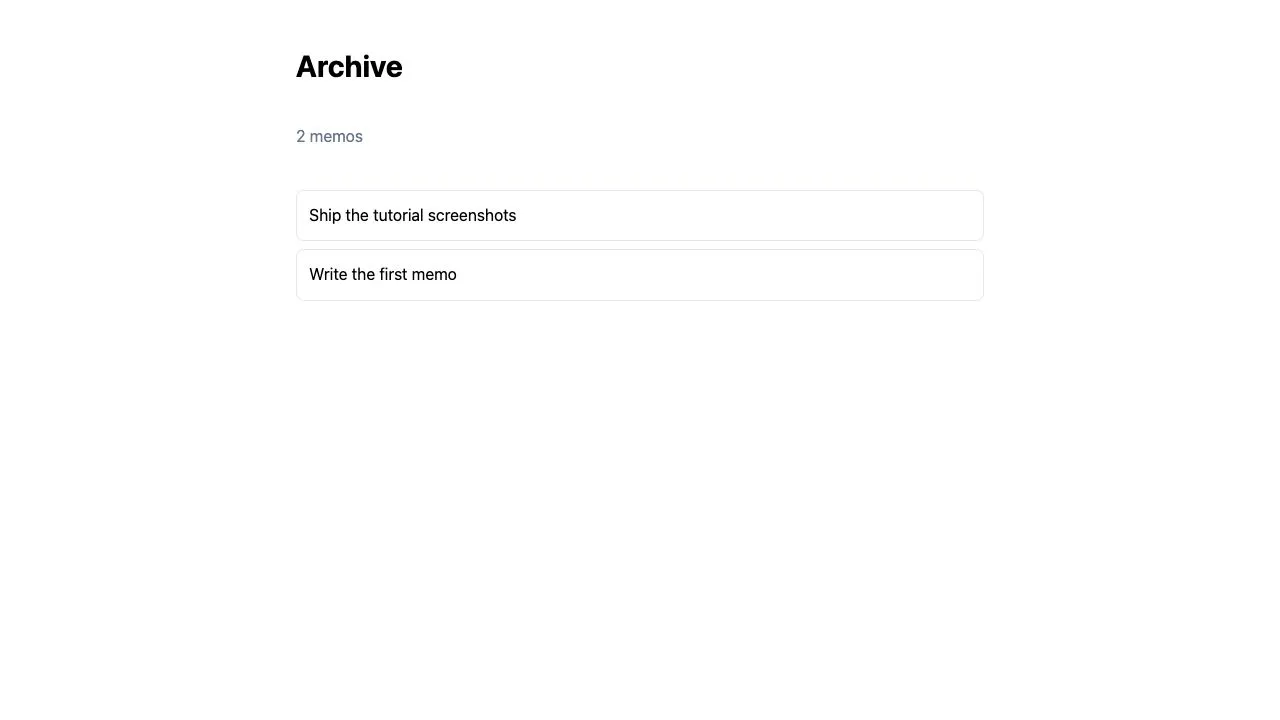
Visit /archive signed in and the list is there. Two routes now, one of them a
single file and one of them a file plus a handler, and neither registered by you.
Why this Load takes a request
Section titled “Why this Load takes a request”Most pages that fetch never write a Load at all. They declare the loader as an
external and bind it in the template, so the call sits in the page’s own
source and the generated handler stays generated:
external LoadMemos(): Memo[]
export component Page(): html {{val memos = LoadMemos()}…}
That shape has no request in it, and no context either. This page needs
auth.User and a database pool, and both arrive on the request context — so it
takes the other rung instead: func Load(w, r) generates the registration and
leaves the response to you.
Two rungs, then, and the signature picks. A Load that is not func(w, r)
fails generation naming what it is and what it must be.
One layout for everything below
Section titled “One layout for everything below”pages/layout.pw.html already exists. It wraps every page under it:
package pages
export component Layout(children: html): html {  <div class="mx-auto max-w-2xl p-8"><slot required /></div>}
A layout must declare children: html — that shape is what makes the compiler
emit the wrapper the generated chain calls. It is not the outermost frame,
though: templates/document.pw.html still owns the doctype and the <head>,
and it wraps the layout chain from outside.
Remember the layout chain. The next section is about it.
4. Partial updates: the layout was already there
Section titled “4. Partial updates: the layout was already there”Add a link to the archive on the home page, and another back:
// handlers/home.pw.html — inside the Home component, above the form<a href="/archive" class="text-indigo-600 underline">Archive</a>Click it and the browser fetches /archive, throws away the document shell and
the layout it already had, and paints the whole thing again. Both pages share
that chrome and neither of them changed.
Turn that off. This one is runtime configuration rather than a project setting,
so it goes in config.dev.toml — pw init already wrote the block with
enabled = false and the key commented out:
[html.update]enabled = truevalidator_key = "${HTML_UPDATE_VALIDATOR_KEY}"export HTML_UPDATE_VALIDATOR_KEY=$(openssl rand -base64 32)Set that variable before pw dev and before pw migrate: a configuration
naming an environment variable that is not set fails to load, and both commands
read this file.
The same URL still answers a complete document to anything that asks for one —
a first visit, a refresh, a crawler, curl. To a page that already holds the
layout, it answers only the boundaries whose markup actually changed.
Watch it, because there is nothing on the page to see. Open the browser’s
network panel, then click the Archive link. The request for /archive now
carries Pw-Render and Pw-Manifest — the second of those is what the page
already holds — and what comes back is a set of replacement instructions
measured in hundreds of bytes rather than a document. Reload the same URL with
F5 and the full document is back, because a reload has no page to describe.
The other half of the claim takes one command:
curl -s http://localhost:8080/about | head -5Doctype, <head>, layout, page. Nothing negotiated it away. A client that sends
no update headers is not a degraded client; it is the path every response takes
until a browser says otherwise.
Nothing in Load changed. Nothing in the template changed. Every layout and
page of a rendered chain is a boundary already, so the layout chain you wrote
for reuse turned out to be the shape a partial update wanted.
The key is not decoration. A boundary is identified by a digest of its own
rendered bytes, and an unkeyed digest of low-entropy content can be confirmed by
guessing — so startup refuses enabled = true without a key rather than serving
one.
An ordinary component call is not a boundary, which is deliberate: a five-hundred-row list would otherwise put five hundred entries in every request. Partial updates covers what to do when you want a region that is not a layout to be one.
5. Async: rendering before the data arrives
Section titled “5. Async: rendering before the data arrives”The archive page waits for ListMemos before it sends a byte. With a hundred
memos nobody notices. With a report over a year of them, the reader watches a
blank tab.
Async rendering breaks that coupling. Declare the parameter async and read it
inside an await block:
package archive
type Memo {  id: int  body: string}
// changed: memos is now pending rather than finished.export component Page(memos: async Memo[]): html {  <h1 class="text-3xl font-bold">Archive</h1>  {await list = memos}    <ul class="mt-8 space-y-2">    {for memo in list}      <li class="rounded-lg border border-slate-200 p-3">{memo.body}</li>    {/for}    </ul>  {fallback}    <p class="mt-8 text-slate-500">Loading memos…</p>  {/await}}
Load passes a handle instead of a slice:
// pages/archive/page.go — the tail of Load, replacing the loop and WriteHTML pw.WriteHTML(w, r, Page(PageParams{ // new: the work starts here, in its own goroutine, and the render // continues without it. Memos: pw.Go(r.Context(), func(ctx context.Context) ([]Memo, error) { var list []Memo for row, err := range queries.ListMemos(ctx, user.AccountID) { if err != nil { return nil, err } list = append(list, Memo{Id: row.Id, Body: row.Body}) } return list, nil }), }))Add "context" to the imports, and delete the loop that used to run before
WriteHTML.
There is no streaming API here, no header, and no flush. pw.WriteHTML asks the
composed document whether it holds an await boundary and picks its own path; a
page without one keeps the ordinary buffered response. Whether a response
streams is a property of the templates, not a decision every handler repeats.
The fallback is required, and that is the honest part of the design: a
boundary has to render something before the value exists, and the framework will
not invent it.
Reload /archive and you will almost certainly not see the fallback. Four rows
out of SQLite settle faster than the browser paints. Make the slow case real for
a moment — time.Sleep(2 * time.Second) as the first line inside the pw.Go
closure, with "time" imported — and reload:
The heading appears immediately. Under it, Loading memos…. Two seconds later the list replaces it, and the network panel shows no second request: the first one was still open. One response delivered in pieces, and the first piece was useful.
Two seconds is under html.async_timeout, which defaults to three. A boundary
that outlasts it does not hang the response — see
Async rendering for what it does
instead.
Take the sleep out again. It was a way to see the mechanism, and leaving it in would make every later reload of this page a demonstration of nothing.
6. Live: a region that keeps arriving
Section titled “6. Live: a region that keeps arriving”Async settles once. A notification count, a queue depth, a chat log all want the opposite — the server learns something new, and a page somebody is already looking at should say so.
Declare a live source and bind it in the same await clause:
// pages/archive/page.pw.html — above the componentexternal live MemoCount(): int// pages/archive/page.pw.html — inside Page, under the h1{await total = MemoCount()} <p class="text-slate-500">{total} memos</p>{fallback} <p class="text-slate-500">counting…</p>{/await}There is no {live} clause, because the wait site never said how often a value
arrives — the declaration did. A source that changes from async to live
changes no template that calls it.
The Go side is a sequence that does not end:
package archive
import (  "context"  "iter"  "time"
  "memoapp/queries"
  "github.com/shibukawa/popcornweb/plugin/auth")
// MemoCount reports how many memos this account has, again every five seconds.//// The context is mandatory for a live source. A sequence that never ends has// nothing else to make it return, and a goroutine outliving its subscription// is a leak with no upper bound. It is also the request's context: the// subscription is answered on the page's own route, so the middleware that// resolved the session for the first render resolved it for this too.func MemoCount(ctx context.Context) iter.Seq2[int, error] {  return func(yield func(int, error) bool) {    user, ok := auth.User(ctx)    if !ok {      return    }    ticker := time.NewTicker(5 * time.Second)    defer ticker.Stop()    for {      select {      case <-ctx.Done():        return      case <-ticker.C:        count := 0        failed := false        for _, err := range queries.ListMemos(ctx, user.AccountID) {          if err != nil {            // A yielded error is a delivery, not the end: the            // boundary shows its recover subtree, and the next good            // value replaces it with primary content again.            if !yield(0, err) {              return            }            failed = true            break          }          count++        }        if failed {          continue        }        if !yield(count, nil) {          return        }      }    }  }}
Counting by reading every row is the wrong query and the right example: it uses
only what chapter 3 already gave you. A real one is a count(*) statement
beside ListMemos in queries/memos.pw.sql.
Open /archive in two tabs, add a memo in one, and watch the count move in the
other within five seconds. Neither Load nor the layout knows this is
happening: a live source is called by generated code with the subscription’s
context, so there is no handle to build and nothing to pass through Params.
One cost is worth knowing before you reach for this. A delivery replaces the
whole boundary subtree, so a live region wrapping a long list pays that list’s
length on every tick. Keep the boundary around the part that actually changes —
which is why the count above is its own await block rather than being folded
into the list.
And this is the one model with a connection open per reader. Live rendering covers the bounds that protects, and when a five-second poll is the better answer.
What you built
Section titled “What you built”Three ways a page changes after the first render, and the reason each exists:
- Partial updates cost you nothing, because the layout chain you write for reuse is already the shape a delta wants.
- Async costs a
fallbackand apw.Go, and buys a page that becomes useful before its slowest query answers. - Live costs a connection and a bounded region, and buys a page that stays true without the reader doing anything.
They compose. One await clause may hold a settled binding and a live one, and
a page using all three is ordinary.
What none of them is, is a client-side framework. The reader received server-rendered HTML from the first byte to the last, and the only browser code involved was one small module that moved finished markup into place.
- Discovered routing — actions, dynamic segments, and where the page shape ends.
- Async rendering — the three clauses, and what bounds a boundary’s wait.
- Testing — handler tests, including a helper that completes the whole login flow in one request.
- pw build — producing the binary you deploy.