
1. Getting started
By the end of this tutorial’s five chapters, memoapp is a memo application
with a form, a database table, and a login that keeps each person’s notes to
themselves. It begins as one page that says hello.
This chapter creates that page, runs it, and changes it. Fifteen minutes, roughly, most of it spent waiting for the first build.
1. Create the project
Section titled “1. Create the project”pw init memoappRun it in whatever directory you keep projects in. The command creates
memoapp/ and refuses to write into a directory that already has files in it,
so there is no way to scatter a scaffold over existing work.
The wizard runs even though you gave a name. The name is one of ten questions,
and knowing it does not mean you have answered the other nine. Arrows or jk
move, a digit jumps, Enter accepts, Esc goes back, Ctrl-C cancels. The
last screen lists every answer, so nothing is written before you have seen it.
Answer this way for the tutorial:
| Question | Answer | Why |
|---|---|---|
| Project name | memoapp |
|
| TinyGo support | No | the default; nothing in this tutorial needs it |
| Router | Registered | the default |
| Tailwind CSS | No | chapter 2 adds it with pw add |
| Authentication | None | chapter 4 adds it with pw add |
| Database | No | chapter 3 adds it with pw add |
| DynamoDB | No | this tutorial does not use it |
| Devbox environment | Yes | the default |
| Redis or Valkey | Yes | the default |
Declining Tailwind and the database is deliberate: the later chapters install
them. A capability you declined at init goes in later with
pw add, and doing that once on your own project says more
than a paragraph about it.
Authentication is asked first, because whether there is a login is what decides whether a store is optional. Answering None here means the questions that follow ask whether you want a database; answering with a login turns them into which store holds it, with no way to decline — a session has to live somewhere.
To run this non-interactively from a script, add --yes: the flags and the
defaults answer everything. A session with no terminal — CI, for instance —
never starts the wizard at all.
Writing the files is not the last step. pw init then runs go mod tidy and
pw generate, so the project compiles by the time it reports success:
Created memoapp
  .              .editorconfig  .gitignore  config.dev.toml  devbox.json  go.mod  popcornweb.toml  public.go  .vscode/       extensions.json  settings.json  cmd/memoapp/   main.go  handlers/      home.pw.html  home_handler.go  index.go  public/        .keep  app.css  templates/     400.pw.html  401.pw.html  ... document.pw.html  templates.go
12 generated files, rebuilt any time by pw generate
Not included: database, dynamo, auth, tailwind  pw add <capability> enables one later
  cd memoapp  devbox shell  pw dev
Only the files you write by hand are named. The generated ones are a count:
*_pw_gen.go files are build inputs, excluded by the .gitignore the same
command wrote, and pw generate remakes them whenever they go missing. They are
not files you open.
2. Run it
Section titled “2. Run it”cd memoappdevbox shellpw devWithout Devbox, skip devbox shell and run pw dev directly — it needs Go on
PATH, and nothing else.
One command covers the whole loop: pw dev starts the
services declared in devbox.json, generates code, applies pending migrations,
then builds and runs the application, restarting it whenever a watched file
changes. Ctrl-C stops all of it together.
One of those services is Valkey. Nothing in this tutorial connects to it — it
is pinned in devbox.json so that a project which later needs a cache or a
rate limiter has the server already running. A project that never will can drop
the package from devbox.json.
The application reports its startup once, ending with the address it accepted:
   .-.   .-. .(   ) (   ).    Popcorn Web v0.1.0(   o     o   )   started at 2026-07-28 09:12:31 JST(    \___/    )   env dev · config.dev.toml '-.__.___.__-'
configuration├─ observability│  ├─ minimum_level  debug       ← file│  └─ stdout_format  plaintext   ← file└─ server   └─ port  8080  ← file
listening on http://localhost:8080
The real tree is longer: it lists every resolved configuration key, framework
and application alike, marks the ones that came from somewhere other than the
built-in defaults, and redacts secrets such as a connection DSN (that rdb branch appears once chapter 3
adds the database). What it is for, and
what it becomes when nothing is attached to a terminal, is described under
Seeing what took effect.
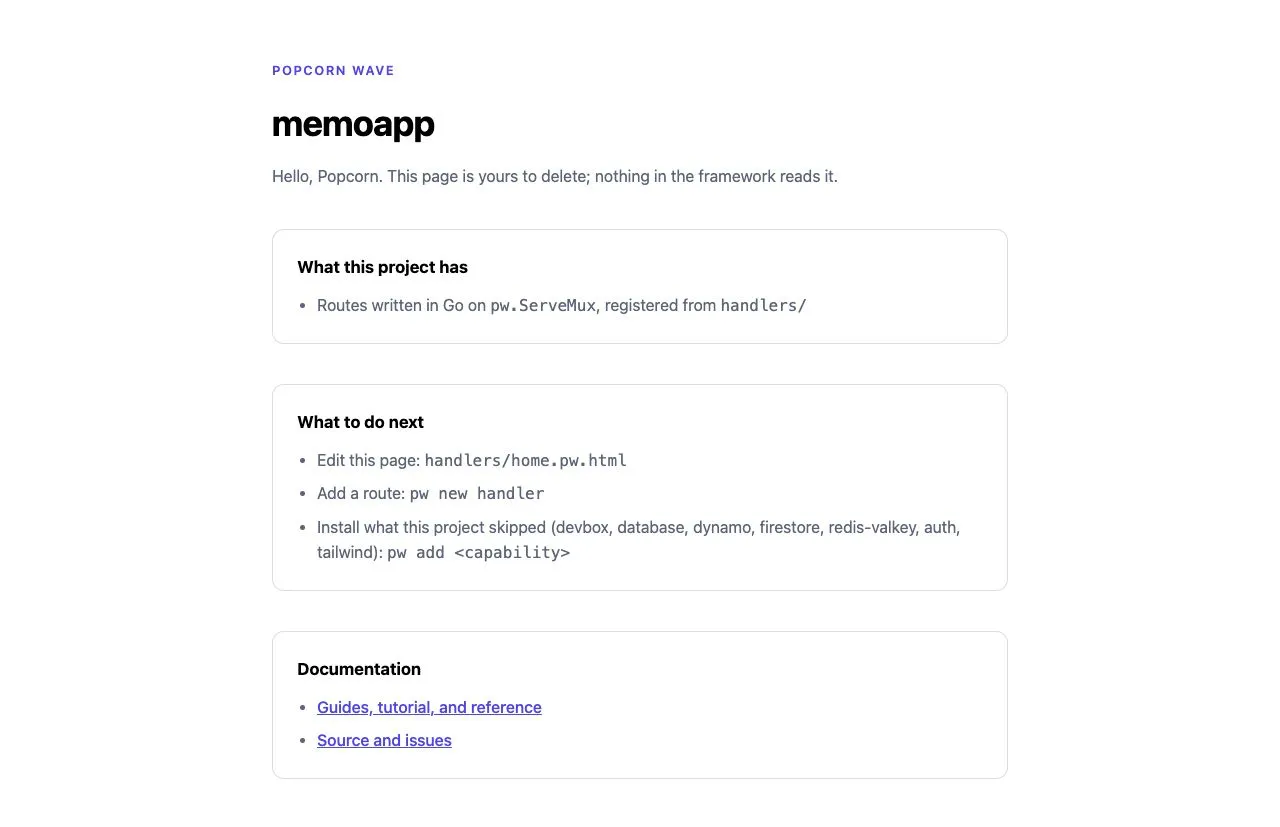
Open http://localhost:8080/. The page says Hello, World. The scaffolded handler also reads a query parameter, so http://localhost:8080/?name=Popcorn greets you by name.
The second address
Section titled “The second address”The loop printed one more line before the application said anything:
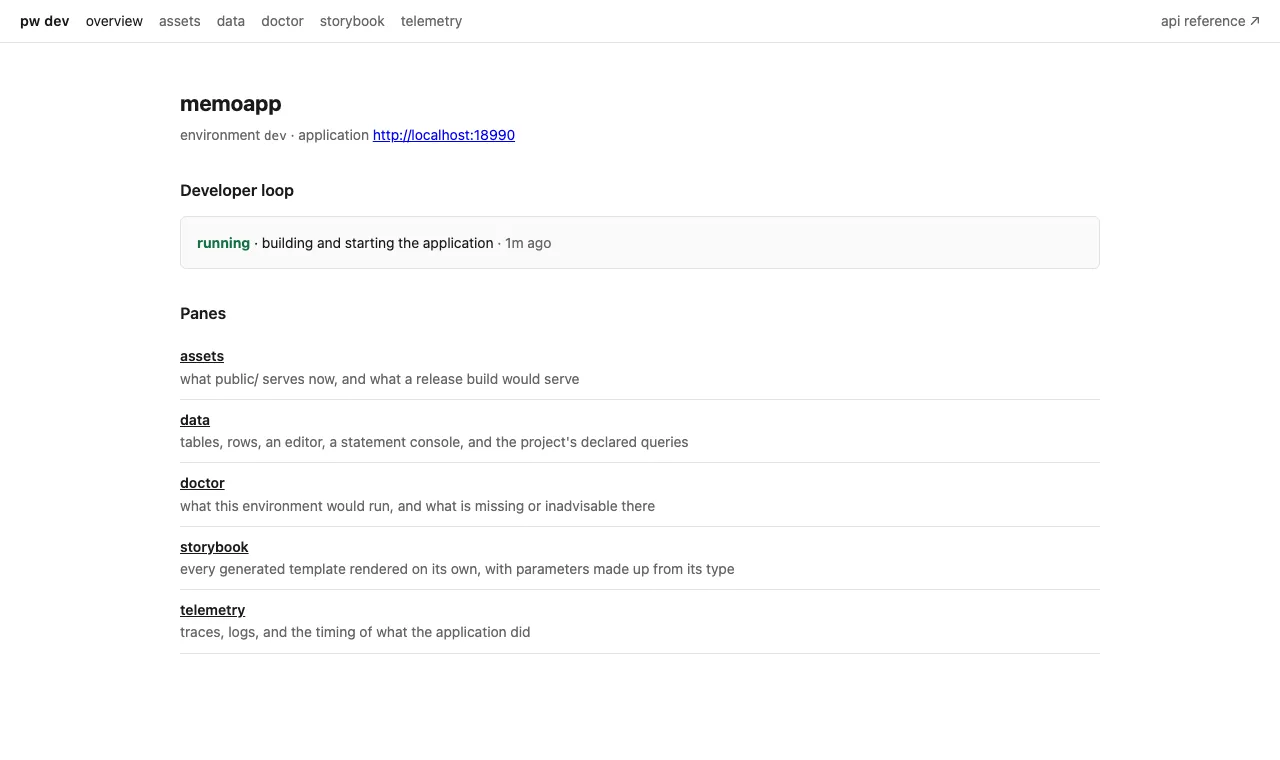
pw dev: console http://127.0.0.1:18081That is the development console, and the rest of this tutorial checks its work there. Each chapter writes something — a template, a migration, a SQL statement — and each of those has a pane that runs it on its own, before any other code exists to call it. The storybook renders one template with parameters made up from its type. The data pane browses the tables the application opened. The queries pane runs a declared statement and shows what it returned.
Opening it now is worth the ten seconds: the overview names the phase the loop is in, and a failed build says so here rather than only in the terminal you have since scrolled. The small button in the corner of every page the application serves opens the same console, so the address above is one you never have to remember.
The console is not part of the application. Every pane is compiled under the
pwdev build tag, which pw build does not set — there is
nothing in a release binary to switch on.
The files you will actually edit
Section titled “The files you will actually edit”pw init wrote a couple of dozen files. Three of them matter today:
| File | What it holds |
|---|---|
handlers/home.pw.html |
the page template — what the browser shows |
handlers/home_handler.go |
the route, and the input it reads from the request |
templates/document.pw.html |
the shell every page is rendered inside |
popcornweb.toml is worth knowing by name: it records the project’s toolchain,
its database engine, and which directories each generation purpose reads.
config.dev.toml is the runtime configuration for APP_ENV=dev, which is where
the port and the log format above came from.
You declined the database, so there is no queries/ and no migrations/ yet;
chapter 3 brings both in with pw add database.
pw init lists the rest of the tree.
One rule applies across all of it. Every .pw.html and .pw.sql file compiles
into a _pw_gen.go file beside its source, and those are build output: Git
ignores them, VS Code hides them, and pw generate recreates them. Edit the
source; never the generated Go.
The page
Section titled “The page”What pw init wrote is not a one-line greeting but a landing page: what this
project was scaffolded with, what to do next, and where the documentation is.
Read the whole file in your editor; here is the top of it.
package handlers
export component Home(name: string, project: string): html {  <div class="page">    <header>      <p class="eyebrow">Popcorn Web</p>      <h1 class="title">{project}</h1>      <p class="lead">Hello, {name}. This page is yours to delete; nothing in the framework reads it.</p>    </header>    <!-- what this project has, what to do next, and documentation links follow -->  </div>}
Delete it whenever you like — the framework never reads it, and chapter 2 replaces the whole thing.
That is not Go, and it is not a runtime template either. .pw.html is a small
typed language of its own, and pw generate compiles this file into a Go
function Home and a parameter struct HomeParams. Type errors and unsafe HTML
insertions are caught while it compiles rather than when a request arrives.
Templates covers the language; the parameter list
is what matters here.
You declined Tailwind, so those class names are the ones pw init defined in
public/app.css. Declining the toolchain costs you its utilities, not a styled
page. Chapter 2 runs pw add tailwind, and the same structure is written with
Tailwind utilities instead — see Styling.
The handler
Section titled “The handler”package handlers
import ( "net/http"
"github.com/shibukawa/popcornweb/pw")
// homeInput is what this route reads from the request.type homeInput struct { // Name is who the page greets. Anything the request does not carry falls // back to the declared default. Name string `query:"name" default:"World"`}
func init() { mux.HandleFunc("GET /{$}", home) }
// home renders the starter landing page.//// The greeting is whoever the request names, and the project the page was// scaffolded for otherwise.func home(w http.ResponseWriter, r *http.Request) { input, err := pw.Parse[homeInput](r) if err != nil { pw.WriteProblem(w, r, pw.BadRequest(err)) return } pw.WriteHTML(w, r, Home(HomeParams{Name: input.Name, Project: "memoapp"}))}An ordinary net/http handler, with two framework calls in it. pw.Parse fills
homeInput from the request — here from ?name=, falling back to the declared
default. pw.WriteHTML renders the fragment Home returned.
The godoc is not decoration. pw generate copies a handler’s comment into the
OpenAPI document: the first sentence becomes the operation summary and the rest
its description, and the comments on homeInput and its fields become the
schema and parameter descriptions. The end of chapter 2 shows where that lands.
mux comes from handlers/index.go, which is three lines long:
package handlers
import "net/http"
var mux = http.NewServeMux()
func Handlers() *http.ServeMux { return mux }
Each handler file registers its own route in init, so adding a route means
adding a file rather than editing a table that every feature has to touch.
That is the standard library router, not a framework one — there is no
Popcorn Web type in this file at all. A project that took TinyGo at pw init
gets pw.ServeMux here instead, which on host Go is a type alias for this same
net/http.ServeMux rather than a wrapper around it; only a TinyGo build swaps
in a compatible implementation of the same pattern syntax. Covering both targets
from one import is that type’s whole job, and a host-only project has no reason
to pay for it.
So the patterns you register are Go 1.22 patterns — "GET /users/{id}" — and
r.PathValue behaves the way it does anywhere else. Route matching, method
matching, and path parameters are all this type owns; middleware and route
metadata are not here.
Notice what the handler does not mention: doctype, html, head, or
body. Those live in templates/document.pw.html, and pw.WriteHTML renders
the page fragment inside that shell. A page template contributes leaf content
only.
3. Change the page
Section titled “3. Change the page”Leave pw dev running. Edit handlers/home.pw.html:
package handlers
export component Home(name: string, project: string): html {  <h1 class="title">Hello, {name}</h1>  <p>Served by Popcorn Web.</p>}
Save it. pw dev regenerates home_pw_gen.go, rebuilds, and restarts the
application; reload the browser and the paragraph is there.
4. Break it on purpose
Section titled “4. Break it on purpose”Adding markup is safe by construction. Changing the component’s interface is where the generated boundary starts doing work — so change it, and watch what happens. Rename the parameter:
package handlers
export component Home(visitor: string, project: string): html {  <h1 class="title">Hello, {visitor}</h1>}
pw dev regenerates, tries to rebuild, and stops:
handlers/home_pw_gen.gohandlers/home_handler.go:21:37: unknown field Name in struct literal of type HomeParamsThe renamed parameter renamed the field of HomeParams, and the handler is
still filling in Name. A template and its caller disagreed about a name, and
the disagreement surfaced as a compile error on the line that has to change —
not as a blank spot in a page some time later. (pw dev prints one further
error below this one: it also failed to read the configuration out of a binary
it could not build. One cause, two messages.)
Look at the browser tab you left open, without touching it. The same failure is now over the page. Every page the application serves carries a small script that watches the loop’s state on the console, so a build that broke is reported where you were already looking rather than only in the terminal behind it.
Do not reload that tab. pw dev stops the running application before it
rebuilds, so until the build succeeds there is nothing listening to answer —
which is exactly why the overlay had to arrive without a reload. Fix the build
and the page comes back on its own.
Fix the handler:
pw.WriteHTML(w, r, Home(HomeParams{Visitor: input.Name}))Save. The build succeeds, the application restarts, and the page is back.
Now undo both edits — rename the parameter back to name and restore
HomeParams{Name: input.Name} — because the next chapter starts from the
scaffolded handler.
When it does not start
Section titled “When it does not start”| What you see | What to do |
|---|---|
listen tcp :8080: bind: address already in use |
another process holds the port, quite possibly an earlier pw dev. Stop it, or set server.port in config.dev.toml |
devbox: command not found |
install Devbox, or skip devbox shell and run pw dev with Go on PATH |
go mod tidy fails while downloading |
the module cache is empty and the network refused. Retry, or set GOPROXY to a proxy you can reach; the scaffold is already written, so pw init does not need to run again |
a .pw.html error with a line and column |
generation rejected the template. The message names the position and the rule — see Templates |
What you have now
Section titled “What you have now”- A project that runs, reloads on save, and answers on
/healthz,/readyz,/openapi.json, and/docsas well as/. - A page template compiled into a typed Go function, and a handler that calls it.
- A build that fails when the two disagree.
Chapter 2 turns that page into something worth submitting: a form, a POST handler, and a validation rule that has to report itself to a person.
- 2. Forms and validation — the next chapter.
- Project structure and principles — the tool, package, and handler model behind what you just ran.
- pw command — every subcommand in full.