
3. Storing the memos
Restart pw dev and every memo from chapter 2 is gone. The list lives in a
slice, and the slice lives in a process.
Moving it into the database means three new pieces: a migration that creates the
table, a .pw.sql file that compiles into typed Go functions, and a handler
that calls them. Half an hour or so, and the handler is the last of the three
rather than the thing that has to exist before you can see whether the other two
work — the console runs a migration’s table and a declared statement on their
own.
0. Add the database
Section titled “0. Add the database”If you declined the database in chapter 1, add it now — following this
tutorial leaves you in exactly that state. If config.dev.toml already has a
[middleware.rdb] section and migrations/ exists, you have one already; skip
to section 1.
pw addWith no argument it lists the capabilities this project does not have yet.
Choose database — the one described as the rdb configuration, the migration
directory, and a typed SQL example. Writing pw add database goes straight
there.
It then asks for an engine; choose SQLite, which is one file and no server
to start beside the application. Accept the review screen and you get
[middleware.rdb] in config.dev.toml, the migrations/ directory, and
queries/ together with the generate.queries entry that makes anything read
it.
migrations/00001_init.sql is comments all the way down. Adding a database does
not also add a table you did not ask for: the file carries the shape of a
migration and the dialect of this project’s engine, and your own version 1 goes
under it.
1. A migration for the table
Section titled “1. A migration for the table”Migrations are plain SQL files in goose
format, numbered in the order they must be applied. Create
migrations/00002_create_memos.sql:
-- migrations/00002_create_memos.sql-- +goose UpCREATE TABLE memos (    id INTEGER PRIMARY KEY,    body TEXT NOT NULL);
-- +goose DownDROP TABLE memos;
-- migrations/00002_create_memos.sql-- +goose UpCREATE TABLE memos ( id SERIAL PRIMARY KEY, body TEXT NOT NULL);
-- +goose DownDROP TABLE memos;-- migrations/00002_create_memos.sql-- +goose UpCREATE TABLE memos ( id INT AUTO_INCREMENT PRIMARY KEY, body VARCHAR(255) NOT NULL);
-- +goose DownDROP TABLE memos;The two annotations divide the file: Up is what this version does, Down is
what undoes it. Writing the Down half now is cheap; reconstructing it later,
from a schema three versions further along, is not.
00001_init.sql was already there, and it creates nothing: it is comments, so
adding a database did not also add a table. Leave it where it is. It is applied,
it costs nothing, and renumbering an applied migration is the one thing
migrations must never do.
The tabs above are the same migration in each engine’s dialect. Nothing
translates between them — pw add database wrote 00001_init.sql in the
dialect you chose, and yours has to match.
pw dev applies pending migrations on startup and again whenever a file in the
migration directory changes, so saving this file is enough:
up 2 00002_create_memos.sql 1msversion 1 -> 2Outside the loop, pw migrate up does the same thing, and pw migrate status
answers what has been applied. See
Migrations.
That line says the file ran. What it produced is one pane away: open the console
at http://127.0.0.1:18081 and take data. The
header names the connection,
the engine, and the schema version — 2, the number the loop just printed — and
memos is in the table list, empty. Its schema tab is the one worth reading,
because it shows the table as the database understands it rather than as your
migration described it.
The tables the framework owns are listed too, marked as such. goose_db_version
is where that version number came from, and it is why renumbering an applied
migration costs an afternoon: the row in that table is the only record that the
file already ran.
2. SQL that compiles
Section titled “2. SQL that compiles”Create queries/memos.pw.sql:
package queries
type Memo {  id: int  body: string}
export statement ListMemos(): sql.many<Memo> {SELECT id, body FROM memos ORDER BY id DESC}
export statement CreateMemo(body: string): sql.exec {INSERT INTO memos (body) VALUES ({body})}
The shape is the same one .pw.html uses: a package line, a declared result
type, and exported declarations with typed parameters. pw generate turns each
export statement into a Go function beside the source.
The result kind decides the signature. sql.many<Memo> returns
iter.Seq2[Memo, error] — rows are streamed rather than collected into a slice,
which is what keeps a large table from becoming a large allocation. sql.exec
returns a sql.Result, which is what an INSERT has to offer.
{body} is a parameter, and it becomes a prepared-statement placeholder — ?
here, $1 on PostgreSQL, decided by project.database in popcornweb.toml.
The generator will not concatenate a template expression into SQL text and
rejects a handwritten placeholder, so a statement written this way cannot become
an injection. The boundary is exactly that: parameters bind values, never
table names, column names, or sort directions.
Two rules will stop generation later, and both are worth knowing before you meet
them. An UPDATE or DELETE without a WHERE clause is rejected outright. And the
SELECT columns must match the declared result type, in order and by name — which
is what makes Memo an accurate description of every row the statement can
return. Queries covers conditional SQL, slice
expansion, and reusable predicates.
3. Run them before anything calls them
Section titled “3. Run them before anything calls them”Save the file and pw dev regenerates. There are two new Go functions in the
project now and not one caller: nothing imports queries yet. Compiling them was
worth something on its own — a typo in a column name is a build error rather than
a request that fails in production — but a statement that compiles can still
return the wrong rows, and that is not a question a compiler answers.
Take the data pane again and follow declared queries. Both statements are
listed with their parameters. Open CreateMemo, type eggs into body, and run
it: one row affected, and above the result, the SQL that ran.
INSERT INTO memos (body) VALUES (?)That is not the pane echoing your source back. It called the same generated
builder the application will call, so a statement whose SQL is assembled
conditionally is assembled here exactly as it will be at request time. Run
ListMemos — no parameters, so there is only the button — and the row comes
back.
The link that makes this possible is one generated file. Package initialisation
is what registers a statement with the pane, and initialisation only runs if
something links the package; a statement written before its caller links from
nowhere. So generation writes a file whose only job is to pull every queries
package into the development binary. It carries the pwdev build tag, which is
why pw build links none of it.
Insert a second memo if you like. They are real rows in the real table — the data pane shows them, and section 5 finds them there.
4. The handler talks to the table
Section titled “4. The handler talks to the table”package handlers
import ( "net/http"
"memoapp/queries" // new
"github.com/shibukawa/popcornweb/pw")
// init is unchanged from chapter 2; the routes stay as they were.func init() { mux.HandleFunc("GET /{$}", home) mux.HandleFunc("POST /memos", createMemo)}
// home lists every memo that has been written.//// changed: memos.list() could not fail, and reading the table can.func home(w http.ResponseWriter, r *http.Request) { // The generated function streams rows. The template wants a slice, so this // is where they accumulate; the per-row err is the failure of reading that // row. var list []Memo for row, err := range queries.ListMemos(r.Context()) { if err != nil { pw.WriteProblem(w, r, err) return } list = append(list, Memo{Id: row.Id, Body: row.Body}) } pw.WriteHTML(w, r, Home(HomeParams{Memos: list}))}
// createMemoInput is the submitted form, unchanged from chapter 2.type createMemoInput struct { // Body is the memo text. It is required and capped at 200 characters. Body string `payload:"body" check:"required,maxlen=200"`}
// createMemo stores one memo and redirects back to the list.func createMemo(w http.ResponseWriter, r *http.Request) { input, err := pw.Parse[createMemoInput](r) if err != nil { pw.WriteProblem(w, r, err) return } // changed: this replaces memos.add(input.Body). if _, err := queries.CreateMemo(r.Context(), input.Body); err != nil { pw.WriteProblem(w, r, err) return } http.Redirect(w, r, "/", http.StatusSeeOther)}Then delete handlers/memos.go. The slice is gone.
Two details in that file are worth pausing on.
The context carries the connection. No handle is passed to
queries.CreateMemo; it takes a context.Context and finds the pool there. The
same call inside pw.Transaction finds the active transaction instead, which is
why one generated function works in both places without a variant that takes a
*sql.Tx.
There are now two Memo types, and the loop inside home converts
between them.
queries.Memo describes a row; handlers.Memo describes what the page renders.
Merging them would be less code today and a worse boundary tomorrow, because the
first column a page stops showing — or the first field it needs that no column
supplies — would have to be resolved in whichever type was carrying both jobs.
5. Run it
Section titled “5. Run it”Save everything. pw dev regenerates queries/memos_pw_gen.go, rebuilds, and
restarts. Reload the page: eggs is already there, because the row you inserted
from the console in section 3 is the same row this handler reads. Nothing about
that was a simulation.
Add a memo through the form. Then stop pw dev with Ctrl-C and start it
again — the list is intact, which is the sentence chapter 2 could not write.
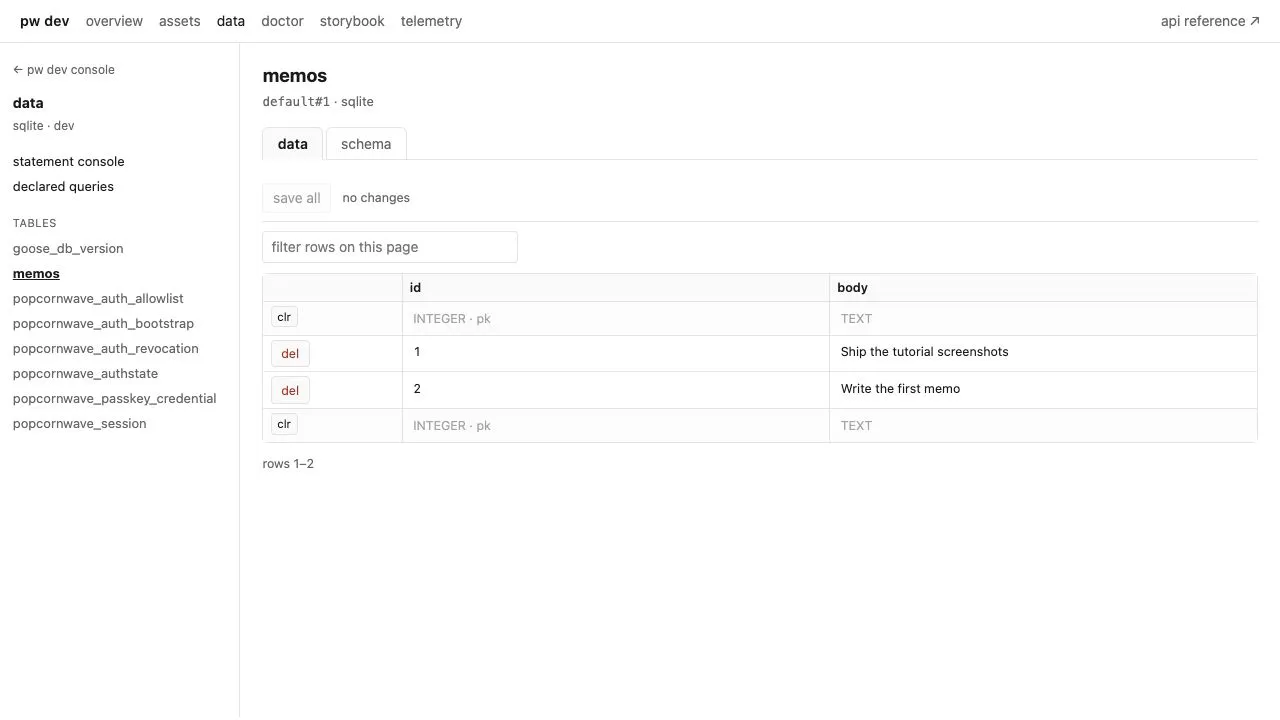
Open the data pane and select memos to see the same rows from the other
side:
In dev, every generated statement is logged as it runs:
{ "level": "INFO", "msg": "sql executed", "sql": "\nINSERT INTO memos (body) VALUES (?)\n", "duration": 0.601708, "operation": "exec", "driver": "sqlite", "rows_affected": 1, "outcome": "ok", "args": "eggs"}A statement slower than the configured threshold brings its query plan and a paste-able rerun snippet with it, without a line of change in your code — see Slow Query Diagnostics.
The database itself is the file memoapp.db, named by the DSN in
config.dev.toml. Deleting it and letting pw dev re-apply the migrations is a
perfectly good reset while the schema is still moving.
What you have now
Section titled “What you have now”- A schema under version control, applied by the same loop that builds the code.
- SQL that stays SQL, compiled into functions whose parameters and rows are typed.
- A page whose contents survive a restart.
Every visitor still sees every memo. Chapter 4 gives the application a notion of who is asking.
- 4. Signing in — the next chapter.
- Queries — conditional SQL, predicates, transactions.
- Relational databases — engines, pool bounds, read replicas.
- Migrations and Seed data — the rest of the schema workflow.