Word, HTML, Markdown
Word documents, HTML pages and Markdown files are all prose laid out into lines, paragraphs, tables and pages, so BDF lays all three out with the same engine (converter/internal/wordproc, shared with EPUB) rather than three separate ones. BDF itself has no relayout. The line breaks and page breaks a viewer draws are exactly the ones the converter chose — so each converter finishes, once, the layout work Word or a browser would otherwise redo every time the file opens.
Try it
Drop a file on the viewer, or try a sample: a Word document, the same kind of document set in Japanese vertical text, an HTML article in reader mode, or a Markdown file. Formulas: in Word, in HTML (MathML) and in Markdown (LaTeX).
Word .docx (converter/docx)
converter/docx reads a .docx and lays WordprocessingML out itself — the same line-breaking and page-breaking work Word does every time it opens the file. It handles line breaking (Japanese kinsoku rules and spacing, tab stops and leaders, justification, the document grid), lists and numbered paragraphs, tables (table styles, merged cells, rows split across a page break, repeated header rows), floating pictures and text boxes with text wrapping around them, columns, sections, headers and footers with page numbers, footnotes, East Asian vertical text (upright kanji and kana, vertical punctuation, turned Latin text and tables), and formulas (Office Math).
Two views come out of a single document: the pages themselves (a flow view with header, body and footer layers), and a second, page-free view that lays the same paragraphs and tables out again as one long column at the body's width — the same idea as Word's draft or web layout view, sharing the pages' fonts and images rather than duplicating them. Drawings go through the same DrawingML renderer PowerPoint uses, and fonts are embedded the same way.
| Option | Values | Default |
|---|---|---|
-param views= |
both, pages, scroll |
both — pages and the scroll view |
See design.md §3.9 for the internals.
Filling a document as a template
A document whose body, tables, text boxes, headers and footers hold tags such as {{name}} is a template of a form that data fills (bdf fill, docx.Fill). The document is laid out again after it is filled: what got longer flows onto the next page, where the header rows of a table repeat. See Making forms.
HTML .html / .xhtml / .mhtml (converter/html)
converter/html lays a page out like a browser's reader view. The author's CSS is discarded, and elements are laid out with a fixed style sheet instead, by the same layout engine the Word converter uses. The article is picked out of a web page with go-readability (a Go port of Mozilla's Readability), and headings, paragraphs, lists, quotations, code, tables (with merged cells and content-driven column widths), figures, links and MathML formulas are all laid out the same way a Word document's would be. Since BDF never relays text out, the result is a scroll view of a fixed width (36 ems of text by default; -param views=pages adds A4 pages). Images are read from files beside the page, from an MHTML archive, from data: URLs, and from the network (fetched by default from public addresses only, so that a document cannot reach what is private to the server converting it; -param remote=false leaves them out, -param private=true fetches from private and local addresses too). SVG — both .svg files and inline <svg> elements — is stored as-is and drawn by the viewer, sized the way a browser would size it. Fonts aren't embedded: they're referred to by name, so a viewer draws the text in its own fonts the way it would a web page (-fonts embed embeds a subset instead).
| Option | Values | Default |
|---|---|---|
-param extract= |
auto, article, none |
auto — pick the article out of a page that looks like one |
-param views= |
scroll, pages, both |
scroll |
-param width= |
text width of the scroll view, in points | 36 ems of the text |
-param size= |
text size, in points | 12 |
-param font= |
font family of the text | an installed sans-serif family |
-param mono= |
font family of code | an installed monospaced family |
-param remote= |
true, false |
true — fetch images from the network |
-param private= |
true, false |
false — fetch images from public addresses only; true fetches from the addresses of the host, its network and its link too |
-param base= |
URL the document came from, for resolving relative links and images | — |
See design.md §3.16 for the internals.
Markdown .md (converter/markdown)
converter/markdown renders a document to HTML with goldmark (CommonMark plus GitHub's tables, task lists, strikethrough and autolinks, footnotes and definition lists) and lays it out the same way converter/html lays out a page — without picking an article out, since the whole file is the content. Raw HTML that README files often carry (<p align="center">, <details>) is laid out along with the rest, and headings get GitHub's own ids, so links to them keep working. Math is written the way GitHub renders it — $…$, $$…$$, and ```math code blocks, all in LaTeX. YAML or TOML front matter becomes the document's Dublin Core metadata.
| Option | Values | Default |
|---|---|---|
-param views= |
scroll, pages, both |
scroll |
-param width= |
text width of the scroll view, in points | 36 ems of the text |
-param size= |
text size, in points | 12 |
-param font= |
font family of the text | an installed sans-serif family |
-param mono= |
font family of code | an installed monospaced family |
-param remote= |
true, false |
true — fetch images from the network |
-param private= |
true, false |
false — fetch images from public addresses only; true fetches from the addresses of the host, its network and its link too |
-param base= |
URL the document came from, for resolving relative links and images | — |
See design.md §3.16 for the internals — the HTML and Markdown converters share one design-notes section, since Markdown is rendered to HTML before this layout stage.
Formulas
Word's Office Math, HTML's MathML and Markdown's LaTeX are laid out by one formula engine, with a formula font (STIX Two Math, Cambria Math or another OpenType MATH font). A formula inside a line makes the line as tall as it needs; one on its own becomes a centered paragraph. For search and copy a formula is text in a linear notation, such as x=(−b±√(b^2−4ac))/(2a).
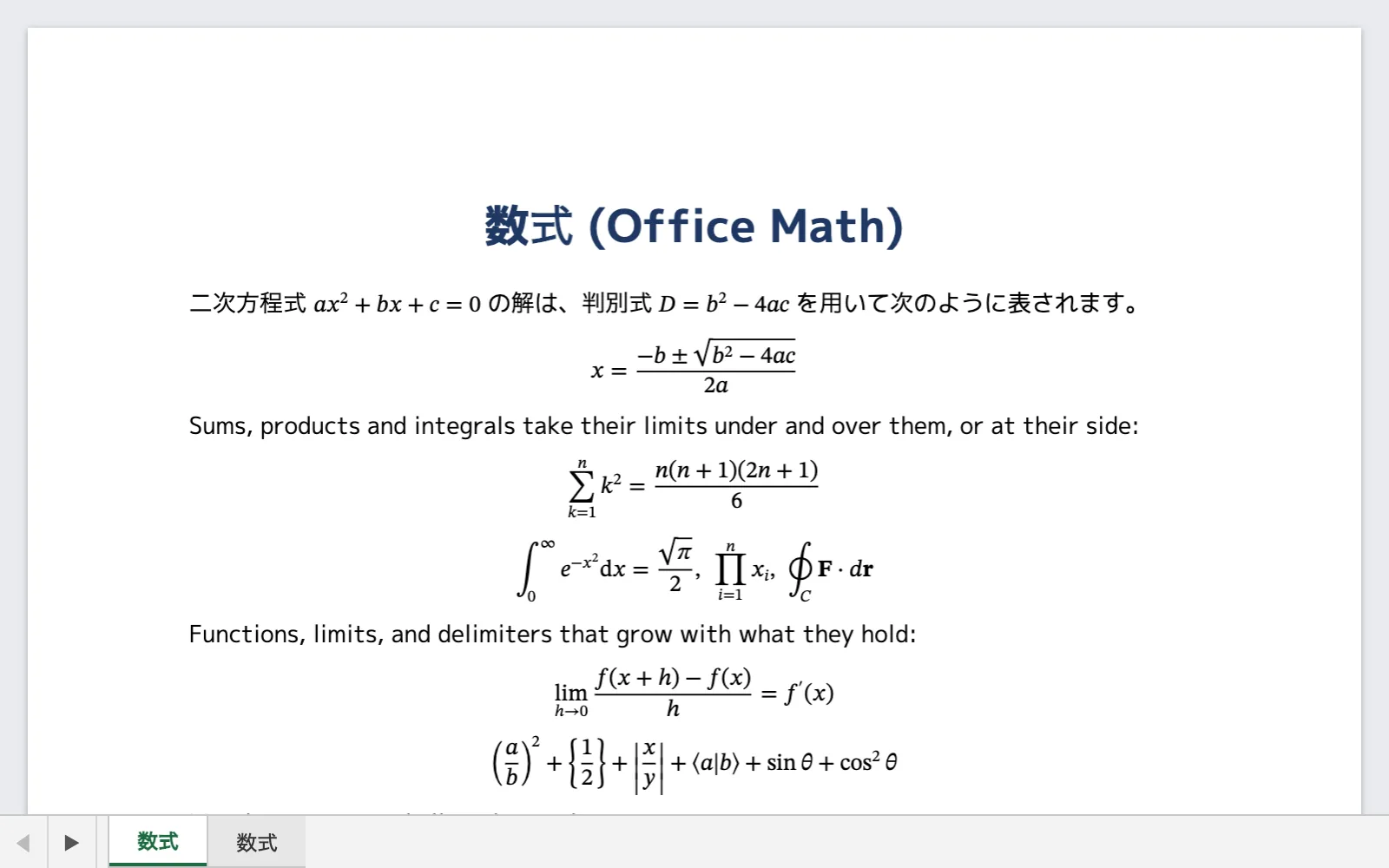
Word — formulas inserted with Insert → Equation (m:oMath, m:oMathPara): fractions, scripts, radicals, sums and integrals, limits, delimiters that grow, matrices, equation arrays aligned at &, accents. The font is the one the document asks for (Cambria Math by default), or STIX Two Math and its like in its place.
<m:oMath>
  <m:r><m:t>x=</m:t></m:r>
  <m:f>
    <m:num><m:r><m:t>−b±</m:t></m:r><m:rad><m:radPr><m:degHide m:val="1"/></m:radPr><m:deg/><m:e><m:r><m:t>b²−4ac</m:t></m:r></m:e></m:rad></m:num>
    <m:den><m:r><m:t>2a</m:t></m:r></m:den>
  </m:f>
</m:oMath>
HTML — math elements (presentation MathML); display="block" is a formula on its own line. Pages typeset by KaTeX or MathJax, and Wikipedia's, are laid out from the MathML they keep beside their own rendering.
<p>The area of a circle is <math><mi>A</mi><mo>=</mo><mi>π</mi><msup><mi>r</mi><mn>2</mn></msup></math>.</p>
<math display="block">
  <munderover><mo>∑</mo><mrow><mi>n</mi><mo>=</mo><mn>1</mn></mrow><mi>∞</mi></munderover>
  <mfrac><mn>1</mn><msup><mi>n</mi><mn>2</mn></msup></mfrac>
  <mo>=</mo>
  <mfrac><msup><mi>π</mi><mn>2</mn></msup><mn>6</mn></mfrac>
</math>
Markdown — LaTeX written the way GitHub reads it: $…$ inside a line, $$…$$ and code blocks of the language math on their own line, with the commands of amsmath and amssymb (\frac, \sqrt, \left…\right, pmatrix, cases, aligned and so on).
The roots of $ax^2 + bx + c = 0$ are

$$
x = \frac{-b \pm \sqrt{b^2 - 4ac}}{2a}
$$

```math
\int_{-\infty}^{\infty} e^{-x^2}\,dx = \sqrt{\pi}
```
Sample files: converter/docx/testdata/math.docx, converter/html/testdata/math.html and converter/markdown/testdata/math.md. To lay out a formula by itself and draw it into an image or on an Ebitengine screen, see Rendering.